
Testing the API locally
How to receive device callbacks on a development machine and test REST commands with Postman before you deploy.
Testing Locally (Without Deploying to a Server)
To test your callback integration from your local development machine — without deploying to a production server — you need to make your local machine reachable from the internet so the Cams Protocol Engine can POST callback data to it.
Option A: Public IP + Port Forwarding
If your internet connection has a public (static) IP address, you can forward an external port to your local application.
Find your public IP
Visit whatismyip.com or run curl ifconfig.me in your terminal. Note your public IP address.
Set up port forwarding on your router
Log in to your router admin panel. Forward an external port (e.g. 8080) to your local machine's internal IP and the port your application is running on (e.g. 3000, 5000, 8080).
Configure the Callback URL
In the API Monitor, set your Callback URL to:http://YOUR_PUBLIC_IP:8080/callback
Test
Trigger a punch on the biometric device. The Cams Protocol Engine will POST the callback data to your public IP, which your router forwards to your local application.
Option B: Tunneling Tools (No Public IP Required)
If you don't have a public IP or can't configure port forwarding, use a tunneling service to expose your local server to the internet.
| Tool | Command | Notes |
|---|---|---|
| ngrok | ngrok http 3000 | Free tier available. Gives you a public HTTPS URL instantly. |
| Cloudflare Tunnel | cloudflared tunnel --url localhost:3000 | Free. No account needed for quick tunnels. |
| localhost.run | ssh -R 80:localhost:3000 ssh.localhost.run | No installation. Works via SSH. |
Start your local application
Run your callback server locally (e.g. php -S localhost:8080 or node server.js or python app.py).
Start the tunnel
Run the tunneling tool. It will output a public URL like https://abc123.ngrok-free.app.
Configure the Callback URL
In the API Monitor, set the Callback URL to the tunnel URL:https://abc123.ngrok-free.app/callback
Test
Trigger a punch. Callbacks will flow through the tunnel to your local machine in real time.
URL Testing
Before going live, verify your endpoints using Postman. We provide a ready-made collection with all 27 RESTful operations pre-configured.
Postman Collection
Download and import into Postman. Set your base_url, stgid, and auth_token variables — then start testing instantly.
Import the collection
Open Postman → Import → drag and drop the downloaded .json file. All 27 RESTful operations appear grouped by category.
Set your variables
Go to the collection's Variables tab and set:
base_url = your RESTful endpoint URL (from API Monitor)
stgid = your device's Service Tag ID
auth_token = your device's AuthToken
Send requests
Select any operation, edit the JSON body with your values, and hit Send. Verify the response matches the expected format documented above.
Postman Example
Below is a screenshot showing a sample API request configured in Postman. Set the method to POST, paste your RESTful endpoint URL with ?stgid=, and use raw JSON body.
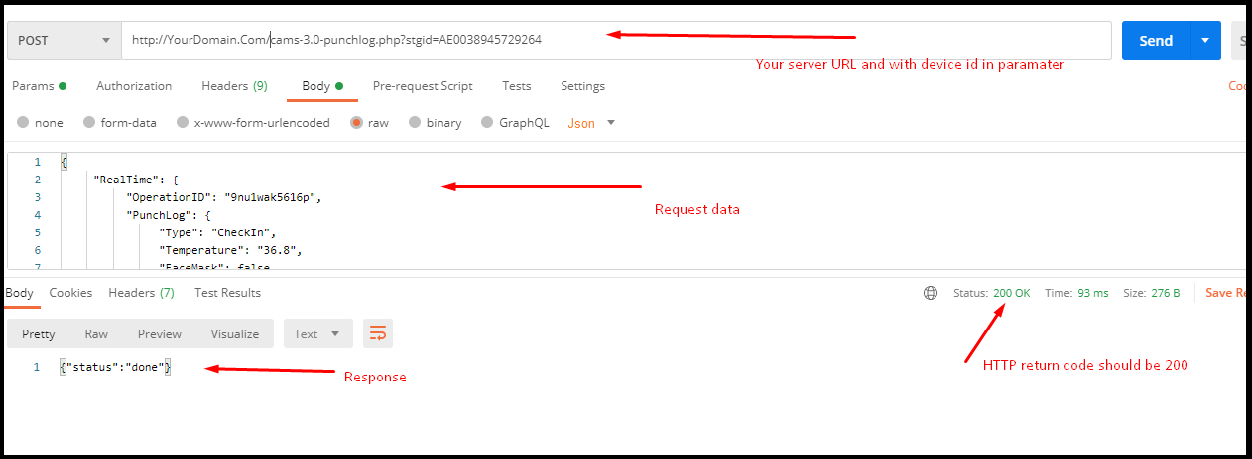
{"status":"done"} with HTTP 200.